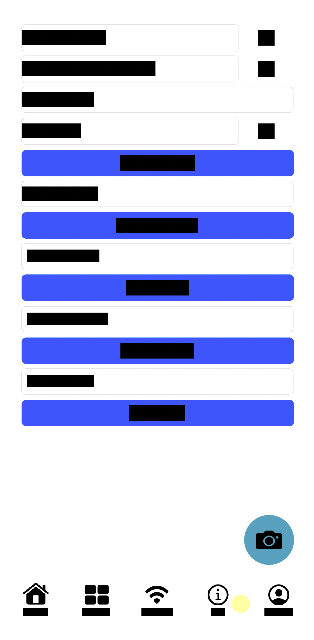

To configure the iOS SDK to automatically redact all text use the configuration below. Any rendered text will be replaced with black bars where the text would have appeared.
Movement and clicks over redacted elements will be captured, but not the selector or text in the redacted element.
let configuration = Configuration(appID: "<APP_SLUG>", textSanitizer: .excluded)
LogRocketSDK.initialize(configuration: configuration)
let configuration = Configuration(appID: "<APP_SLUG>", textSanitizer: .excluded)
SDK.initialize(configuration: configuration)Due to recent changes in how Xcode 26 compiles SwiftUI views, text sanitization is sometimes imperfect when
textSanitizer: .excludedis passed.If your app is built using Xcode 26 and SwiftUI please double check all text is redacted properly when relying on
textSanitizer: .excludedto exclude all text by default. It is expected that some non-text elements will be "over-redacted" by default to minimize the chance of text leaking through.To fine-tune results by manually marking elements to be redacted / shown, follow the instructions here.
If some text is still not redacted properly please reach out to our support team.
Example Screenshot