

Make sure you have installed the minimum package version: 1.17.0.
For customers with self-hosted installations of LogRocket, mobile SDK version
1.17.0requires a minimum server version of16.462.0.
About SwiftUI
The LogRocket SDK works with SwiftUI in the same way as the existing iOS SDK, as outlined in the iOS docs, with the following known limitations.
SwiftUI Differences from UIKit
View Names
As with UIKit, LogRocket can automatically infer information about the view hierarchy in SwiftUI. Because views are defined declaratively in SwiftUI, which handles management of the rendered view hierarchy under the hood, automatically detected view selectors contain the more generic names of the underlying views that comprise the rendered interface, rather than custom SwiftUI View names or the SwiftUI library names for declarative views. Manually tagged view names will be injected into these selectors, and searchable in LogRocket filters.
Custom view tags are added using the lrAddClass modifier, which takes a string value that is treated as the ID for a given View in its selector.
func lrAddClass(_ viewSelector: LocalizedStringKey) -> some ViewParameters
viewSelector
The string to be included in the View's recorded selector
Return Value
A view with an associated string detectable by the LogRocket SDK for selector generation
Navigation
As with UIKit, SwiftUI screens may not be meaningful on their own. As such, we recommend using the Manual Page Identification API to best track navigation events.
Individual view redaction
SwiftUI redaction precision and stability was improved in SDK version
3.8.0.
The SwiftUI accessibilityIdentifier modifier cannot be used to apply redactionTags to individual private views, because the modifier does not apply the passed value to the views comprising the rendered application interface. Instead, our custom lrHide modifier can be used to mark SwiftUI Views for redaction.
// Definition
func lrHide() -> some View

// Example Usage
Text("Green").foregroundColor(.green).tag(Color.green).lrHide()
Return Value
A view with an associated redaction indicator, which the LogRocket SDK uses to prevent the view's contents from being recorded.
Individual view allowlisting
Individual subviews of redacted SwiftUI Views can be allowed for view capture using our custom lrShow modifier
// Definition
func lrShow() -> some View

// Example Usage
// Label icon and first button are captured, label text and second button are not
ScrollView {
  Label(title: {
    Text("Hidden Label Text").lrHide()
  }, icon: {
    Image(systemName: "text.magnifyingglass")
  }).lrShow()

  Button("Allowed Button", action: {}).lrShow()
  Button("Hidden Button", action: {})

}.lrHide()
Return Value
A view with an associated allow indicator, which the LogRocket SDK uses to allow the view's contents to be recorded.
Limitations
Support for text capture and filtering
While SwiftUI text-containing views will be rendered in session replay, iOS renders SwiftUI content differently than it does traditional UIKit-based content, so support for some text-related SDK functionality is currently limited.
| Functionality | Support | Notes |
|---|---|---|
| Visual text in session replay | Supported | SwiftUI text is generally captured as part of the rendered view or bitmap. |
| Element Visible “with text” filtering | Partial | Supported as a non-retroactive-filter only |
| Text attached to touch events | Supported | Touch events include associated, non-redacted SwiftUI text. |
| Automatic text sanitization | Supported | See Sanitization and view tagging for details. |
Sanitization, redaction, and view tagging
Due to changes in how Xcode 26 compiles SwiftUI views, text sanitization is sometimes imperfect when
textSanitizer: .excludedis passed.See full documentation here for more information.
While complete masking rules still apply, such as Automatically Sanitize Text and Sanitize Network Data, there are current limitations with redacting individual views.
iOS 26+
The View interface that a developer interacts with when building SwiftUI apps doesn't extend to apps running on user devices, when LogRocket performs view capture. Instead, SwiftUI transforms apps' declared views into UIKit and Core Animation objects at runtime. SwiftUI is simply a more developer-friendly abstraction over these lower-level frameworks.
Beginning in iOS 26, Apple made changes to the way that SwiftUI views are materialized at runtime, often collapsing distinct SwiftUI views into combined UIKit objects at runtime. These changes present challenges to the SDK's ability to map lrHide and lrShow marked views to their runtime representations. For optimal replay fidelity and performance for SwiftUI apps that take advantage of LogRocket's view capture redaction capabilities, we recommend upgrading to LogRocket SDK version 3.8.0.
On SDK versions prior to 3.8.0, the LogRocket SDK will redact marked content, but to ensure that content is properly hidden in replay, the SDK will frequently over-redact content marked with the lrHide view modifier. On these versions of the SDK, you may find that sibling and even parent view elements of lrHide-marked views are also redacted in replay. Version 3.8.0 addresses these shortcomings.
Container Views
Container view types do not comprise rendered views, and are instead strictly function as layout information for constructing the hierarchy of their contained views. Because of this, tagging and redaction added on a container view will be applied on all individual view within the container, instead of on the container itself. Container views include: Stacks (HStack, VStack, ZStack, LazyHStack, LazyVStack), Grids (Grid, LazyHGrid, LazyVGrid), Form, ForEach, Group, LabeleldContent, List, ScrollView, ViewThatFits.
Custom Views
In order to redact a custom SwiftUI View from session replay, lrHide must be applied inside of the body definition for the custom View. Applying the modifier to the invocation of the custom may not redact all contents of the custom View.
This same limitation also applies to manual view tagging. In order for all contents of a custom view to include the passed string in their recorded selectors, the lrAddClass must be applied inside of the custom view's body definition, not to the invocation of the custom view inside of another view's body
Example
struct LandmarkItem: View {
  var landmarkName: String
  var shouldHide: Bool?

  func getBody() -> any View {
    if shouldHide == true {
      return (
        ScrollView{
          Image(landmarkName.lowercased())
          Spacer()
          Text(landmarkName)
        }.padding(.horizontal).lrHide()
      )
    }
    return (
      ScrollView{
        Image(landmarkName.lowercased())
        Spacer()
        Text(landmarkName)
      }.padding(.horizontal)
    )
  }

  var body: some View {
    AnyView(getBody())
  }
}

struct ContentView: View {
  var body: some View {
    VStack {
      // INCORRECT
      // This line redacts only part of the entire LandmarkItem view,
      // the Text portion in this case
      LandmarkItem(landmarkName: "Chincoteague").lrHide()

      // CORRECT
      // This line redacts the entire LandmarkItem by applying lrHide
      // to the outermost SwiftUI library View, HStack in this case
      LandmarkItem(landmarkName: "Umbagog", shouldHide: true)
    }
  }
}
AsyncImages
When redacting an AsyncImage, the lrHide modifier must be applied on the loaded image, as opposed to on the entire view. For example:
AsyncImage(url: URL(string: "https://example.com/image.jpg")) { image in
  image
    .resizable()
    .lrHide()
} placeholder: {
  ProgressView()
}
Redacting Menus
When some Picker type elements are tagged to be hidden with lrHide, the SDK does not automatically redact the contents of the associated dropdown or menu overlay. The way these menus are rendered does not allow our SDK to associate these back with the view which was redacted. Redacting context menus requires the additional redactMenus: true configuration value when calling initialize(). This applies to the menus rendered by the following View types:
PickerwithpickerStyle(.menu)DatePicker
Examples
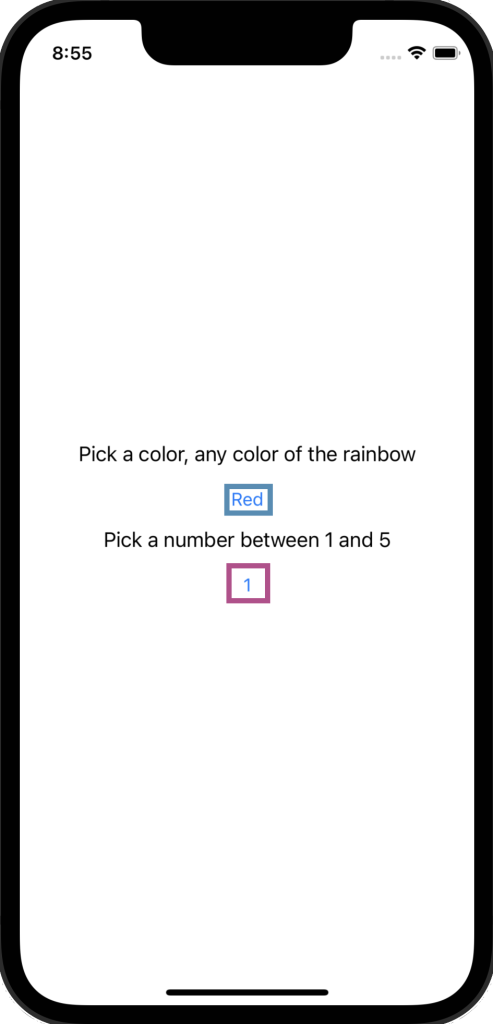
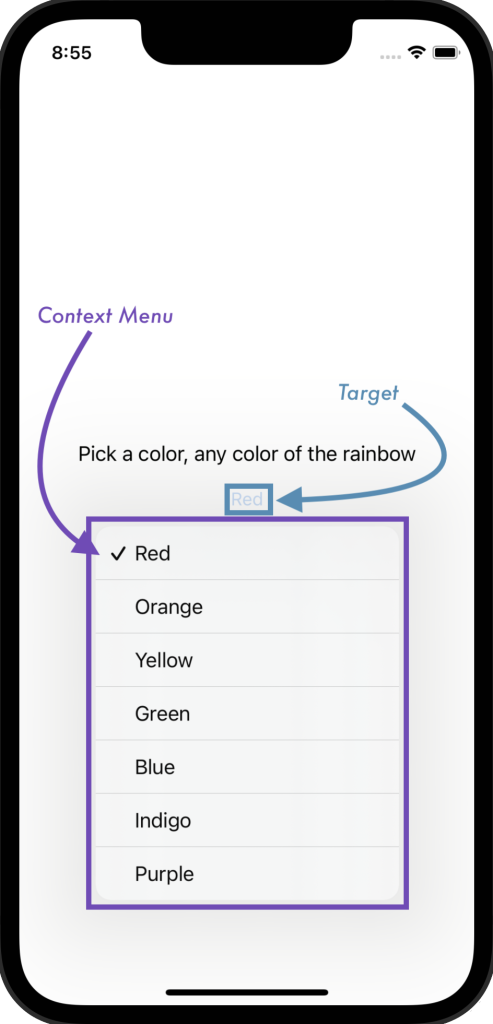
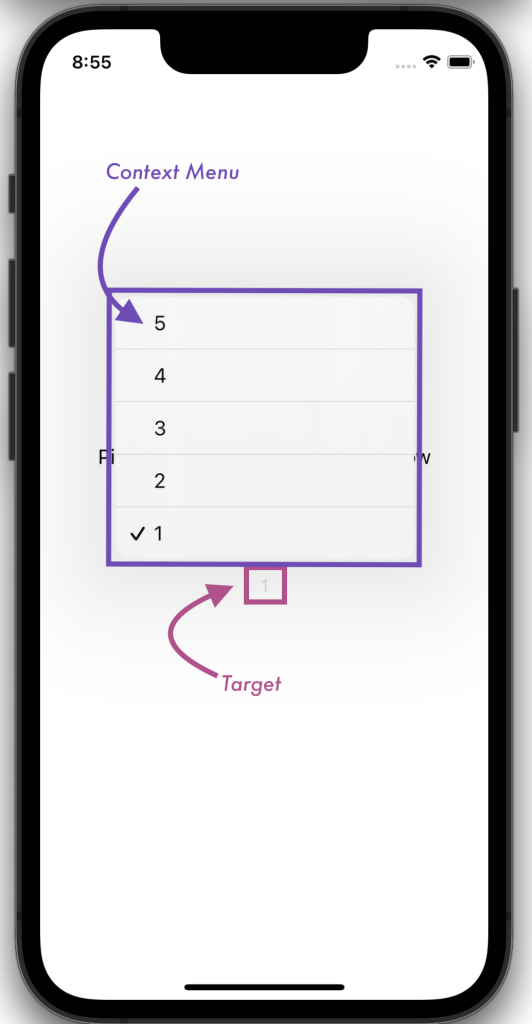
In the following view implementation, the target (outlined in teal) for the Color Menu view will always be redacted from session recordings, because the Picker view is modified with lrHide. The target for the Number Menu view, which uses pickerStyle(.menu), will not be redacted from session recordings.
When redactMenus: trueis included in the Configuration sent to initialize(), both Context Menus will be redacted from session recordings (regardless of whether the Picker element by which they were generated has the lrHide modifier.
When redactMenus: falseorredactMenus is excluded from the Configuration, neither Context Menu will be redacted, despite the Picker element that generates the Color Menu being modified with lrHide.
var body: some View {
  VStack {
    Text("Pick a color, any color of the rainbow")
    Picker("Color Menu", selection: $color) {
      Text("Red").tag(Color.red)
      Text("Orange").tag(Color.orange)
      Text("Yellow").tag(Color.yellow)
      Text("Green").tag(Color.green)
      Text("Blue").tag(Color.blue)
      Text("Indigo").tag(Color.indigo)
      Text("Purple").tag(Color.purple)
    }.pickerStyle(.menu).lrHide()

    Text("Pick a number between 1 and 5")
    Picker("Number Menu", selection: $number) {
      Text("1").tag(1)
      Text("2").tag(2)
      Text("3").tag(3)
      Text("4").tag(4)
      Text("5").tag(5)
    }.pickerStyle(.menu)
  }.onAppear({
    LogRocketSDK.initialize(
      Configuration(
        appID: 'my-org/my-app',
        redactMenus: true
      )
    )
	})
}
var body: some View {
  VStack {
    Text("Pick a color, any color of the rainbow")
    Picker("Color Menu", selection: $color) {
      Text("Red").tag(Color.red)
      Text("Orange").tag(Color.orange)
      Text("Yellow").tag(Color.yellow)
      Text("Green").tag(Color.green)
      Text("Blue").tag(Color.blue)
      Text("Indigo").tag(Color.indigo)
      Text("Purple").tag(Color.purple)
    }.pickerStyle(.menu).lrHide()

    Text("Pick a number between 1 and 5")
    Picker("Number Menu", selection: $number) {
      Text("1").tag(1)
      Text("2").tag(2)
      Text("3").tag(3)
      Text("4").tag(4)
      Text("5").tag(5)
    }.pickerStyle(.menu)
  }.onAppear({
    SDK.initialize(
      Configuration(
        appID: 'my-org/my-app',
        redactMenus: true
      )
    )
	})
}
Liquid Glass
Liquid Glass elements use the device GPU to render more complex graphics and compositing effects. LogRocket session replay is unable to replay these GPU enhancements within a browser.