

Ask Galileo
A conversational bot for every LogRocket user and agent.
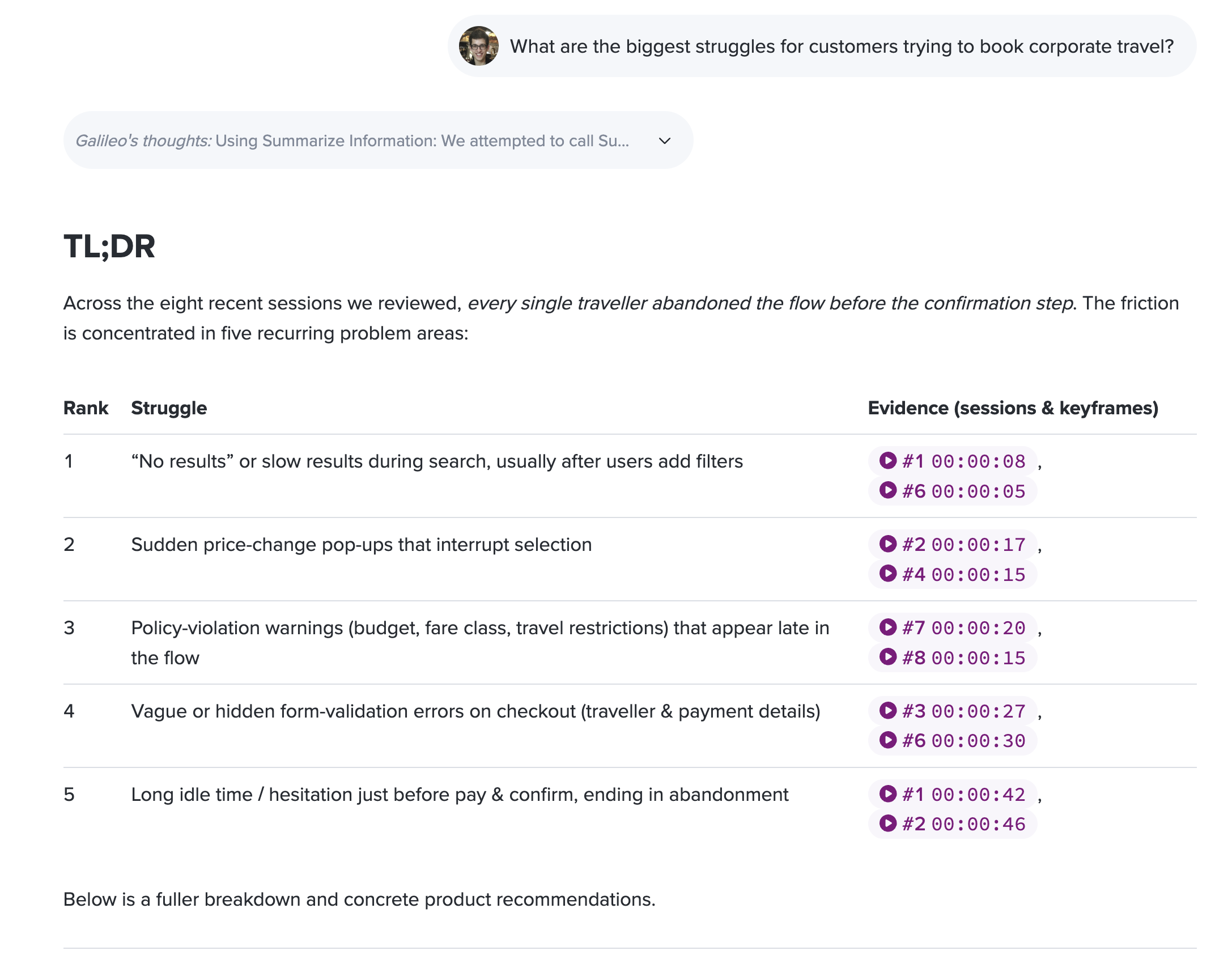
Ask Galileo is a chatbot interface to ask any question of your data in LogRocket, in natural language. Even with great dashboards, most product and support questions go unanswered, as figuring out the correct query can be time-consuming and challenging:
- “Where are customer struggling most on the plans page?”
- “What are the top issues that users have encountered in the past month?”
- “Show me sessions where users abandoned checkout on mobile in the last week.”
Answers in minutes - Ask Galileo provide instant responses, crafting artifacts such as charts, funnels, or session playlists and answer your questions. We focus on quality over speed, so you may have to return to see your answer.
Asks clarifying questions - when Ask Galileo is unsure, it'll ask clarifying questions to ensure it can provide a more accurate response.
Use Ask Galileo directly from the LogRocket dashboard, or connect to your other tools and agents via our MCP Server
If you're already a LogRocket user, go try Ask Galileo here: app.logrocket.com/r/ask-galileo
When to Use Ask Galileo
Ask Galileo is most effective in the following scenarios:
- Planning a new feature - Use Ask Galileo to understand how your product is currently being used before you build something new. This helps you prioritize and design with real user behavior in mind.
- After launching a feature or update - Analyze how a new release is performing and discover issues early. Ask Galileo can compare usage patterns before and after a change.
- Investigating user problems - When a user reports a bug or has trouble, use Ask Galileo to dig into what happened in their sessions and identify root causes.
For each of these, you can start with Ask Galileo interactively, and then build automated workflows using the API or MCP server so you don't have to remember to prompt it manually (e.g., for support ticket investigation, NPS follow-ups, or post-launch recaps).
Tips for Getting the Best Results
- Ask it to watch sessions - If you're not getting the results you expect, encourage Ask Galileo to watch sessions. Session replay analysis often provides the most detailed and actionable insights.
- Be specific about what you want analyzed - Having a sense of the URL, click target, or custom event you want to investigate helps Ask Galileo produce more relevant results.
- Take advantage of cohort comparisons - By default, Ask Galileo watches 100 sessions per query. If you ask it to compare data across cohorts (e.g., "compare usage of feature X from last week vs. this week"), it will watch 100 sessions from each cohort.
- Ask follow-up questions - Ask Galileo remembers context within a conversation. You can refine your analysis by asking follow-up questions to drill deeper into results.
- Automate common prompts - If you find yourself repeatedly asking similar questions (e.g., investigating support tickets or analyzing feature launches), consider automating those prompts using the LogRocket API or MCP server integration.
Example Prompts
Here are some example prompts to help you get started, organized by use case:
Analyze User Behavior
- "What are the top 10 most visited pages in my app in the past month?"
- "Which elements on the checkout page get the most clicks?"
- "How are users navigating from the homepage to the pricing page?"
- "What percentage of users complete the onboarding flow?"
- "Show me a path analysis of where users go after visiting /dashboard."
Identify Problems
- "What are the top issues that users have encountered in the past week?"
- "Are there any pages with unusually high rage click rates?"
- "What JavaScript errors are users experiencing most frequently on mobile?"
- "What are the most common frustration signals on the settings page?"
- "Are there dead clicks on the checkout page?"
Find & Watch Sessions
- "Show me sessions where users abandoned checkout on mobile in the last week."
- "Find sessions from users who experienced errors on the dashboard page today."
- "Show me sessions where users spent more than 5 minutes on the signup form."
- "Watch sessions from users with email containing acme.com and tell me what they're doing."
Post-Launch Analysis
- "How has traffic to /pricing changed this week compared to last week?"
- "Are there any new errors appearing since our latest deploy?"
- "What were the most recent releases and how are they performing?"
Support & Customer Investigation
- "What happened in the sessions for user [email protected] in the past 24 hours?"
- "Watch the last 5 sessions for user [email protected] and tell me what went wrong."
- "Find sessions where users with email containing bigcorp.com visited the billing page."
Prompts by Persona
Product Managers
- "What are the most common user flows leading to /checkout, and where do users drop off?"
- "How has traffic to the onboarding flow changed week over week?"
- "Show me a funnel from /signup to /onboarding/complete to /dashboard."
- "What are users doing on the pricing page? Watch some sessions and tell me."
Engineers / Developers
- "What are the most frequent JavaScript errors on the checkout page this week?"
- "Are there any new errors since our latest deploy?"
- "Show me sessions where users encountered errors on /dashboard and tell me what happened."
- "What issues are affecting users on mobile devices?"
Customer Support / Success
- "What happened in the last 5 sessions for user [email protected]?"
- "Find sessions from users with email containing bigclient.com who visited /billing."
- "Watch sessions from users on the settings page who rage-clicked and tell me what went wrong."
- "What are the top issues affecting users this week?"
UX Designers
- "Where are users rage-clicking most frequently on the settings page?"
- "What is the typical navigation path from the homepage to the upgrade flow?"
- "Watch sessions of users on the signup form and tell me where they struggle."
- "Which elements on the dashboard page are users clicking most, and which are being ignored?"
Feature Support
The Ask Galileo button sits boldly in the main side navigation, it can't be missed!
The following "skills" are currently supported:
- Answering questions with metrics - Timeseries, tables, funnels, heatmaps, session playlists, and path analyses
- Watching sessions
- Querying issues/errors
- Reading customer feedback (from Feedback Insights)
Galileo Code
Galileo Code improves Galileo's understanding of your application by giving it direct access to your codebase. With this context, Galileo can better identify root causes of issues, correlate user behavior with specific code paths, and suggest concrete code changes based on its findings.
To get started with Galileo Code, install the GitHub app on your repository: https://github.com/apps/logrocket-galileo-code
To learn more, see Galileo Code.
Getting Started
To start using Ask Galileo, visit app.logrocket.com/r/ask-galileo. You can also access it from the Ask Galileo button in the main side navigation of your LogRocket dashboard.
Updated 4 months ago