

MCP Replay
Record the requests your MCP server handles as LogRocket sessions to see how AI agents use your product. SDKs for TypeScript, Python, and Go.
BetaMCP Replay is in beta. The SDKs and how MCP sessions appear in LogRocket may change before general availability. Contact [email protected] or your CSM to share feedback or get help.
Summary
If you run an MCP (Model Context Protocol) server, LogRocket can record the requests it handles as LogRocket sessions. Add one of the MCP Replay SDKs to your server to see how users' AI agents interact with your product, just like session replay shows how people use your app. This lets you:
- See what agents do with your tools. Tool calls, resource reads, prompt gets, and listings are recorded with arguments, results, and latency data.
- Find and fix failures. Errors thrown by your handlers show up as LogRocket issues, allowing MCP failures to be tracked and alerted on like other errors.
- Understand who's using your server. Sessions are tied to your users and to the MCP client they used (e.g., Cursor, Claude, ChatGPT), with the same user, release, and location filters as your other sessions.
This page is about recording your MCP server. To connect AI tools to LogRocket's own MCP server and query your LogRocket data, see MCP.
What it looks like
MCP sessions are listed alongside your other LogRocket sessions. They have no visual replay. Each request your server handled appears in the session's Network tab, in the order it happened.
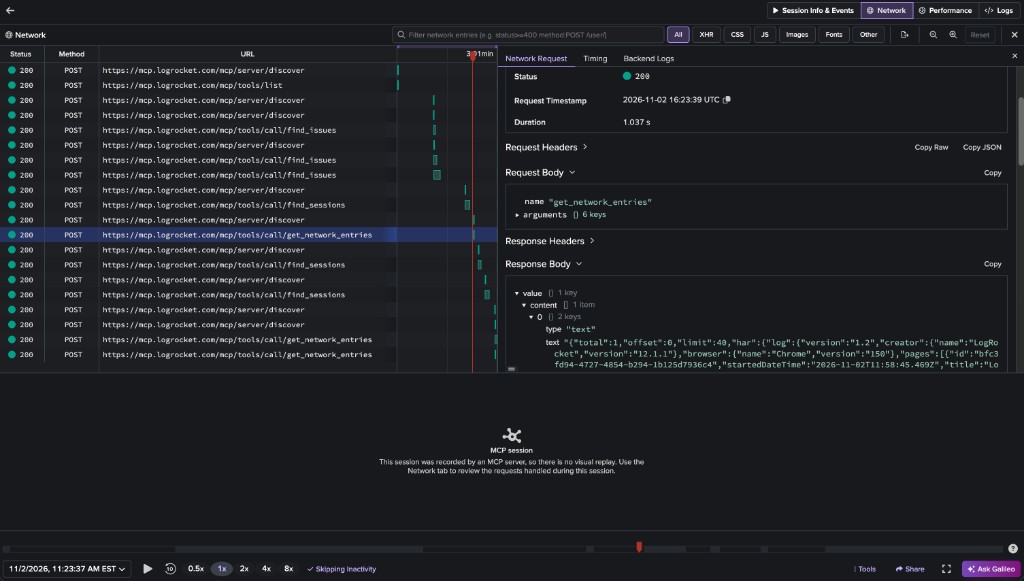
An MCP session in the Network tab. Each tool call is a request, with the tool's arguments in the request body and its result in the response body.
Each request shows:
- URL: the MCP method and target, appended to your server's URL. For example, a call to a tool named
search_ordersappears ashttps://example.com/mcp/tools/call/search_orders. Servers that don't record their URL (e.g., stdio servers) usemcp://<your_organization_id>/<your_project_id>instead. - Request: the params the client sent (for a tool call, the tool's
nameandarguments), and the HTTP request headers with credentials redacted (see Data and privacy). - Response: the result your server returned, under
value. If the handler threw an error, the response contains itserrorMessageand, for JSON-RPC protocol errors, itserrorCode. - Duration: how long your handler took.
- Status: an HTTP-style status that summarizes the outcome:
| Status | Meaning |
|---|---|
200 | The request succeeded. |
400 | The handler threw a JSON-RPC protocol error for a bad request (parse error, invalid request, or invalid params). |
404 | The handler threw a JSON-RPC "method not found" error. |
500 | The handler threw any other error, or returned a result with isError: true (e.g., a failed tool call). |
Errors your handlers throw (or return, in Go) are also recorded as LogRocket issues. Tool results with isError: true are how MCP reports expected failures (e.g., a tool given bad input), so they're shown with a 500 status but don't create issues.
In place of a browser, each session records the MCP client's User-Agent header, or its MCP client name and version (e.g., Cursor/1.2.0) if it didn't send one. Location is derived from the client's IP address when your server is reachable over HTTP.
Galileo can analyze MCP sessions too, using the recorded requests in place of video. For example, you can ask the LogRocket MCP server to watch the MCP sessions of a user who reported a problem.
Supported SDKs
| Language | Package | Supported MCP SDKs |
|---|---|---|
| TypeScript/JavaScript | @logrocket/mcp-replay | @modelcontextprotocol/server 2.x, on any JS runtime with fetch (Node, Cloudflare Workers, Bun, Deno, etc.) |
| Python | logrocket-mcp-replay | mcp 1.x (FastMCP, low-level Server) and 2.x (MCPServer, low-level Server), and fastmcp 2.x through 4.x. Python 3.10+ |
| Go | github.com/LogRocket/logrocket-mcp-replay-go | github.com/modelcontextprotocol/go-sdk 1.x. Go 1.25+ |
Every SDK works over any MCP transport (stdio, Streamable HTTP, and SSE).
Setup
Before you start
Create an API key in the LogRocket dashboard under Settings > API Keys, in the project you want your MCP sessions recorded to. The API key both authenticates uploads and determines which project sessions are recorded to, so there's no separate app ID to configure. Every example below reads the key from a LOGROCKET_INGEST_KEY environment variable.
TypeScript/JavaScript
Install the SDK:
npm install @logrocket/mcp-replayThen call instrument on your server:
import { instrument } from '@logrocket/mcp-replay';

const server = buildMyMcpServer();

instrument(server, {
  apiKey: process.env.LOGROCKET_INGEST_KEY,
  getUser: ctx => {
    const sub = ctx.http?.authInfo?.extra?.sub;
    return sub ? { id: String(sub) } : undefined;
  },
});
instrument wraps every request handler on the server, including handlers registered after it's called.
Cloudflare Workers
Pass waitUntil so uploads complete after the response is returned:
export default {
  async fetch(request, env, ctx) {
    const createServer = () =>
      instrument(buildMyMcpServer(), {
        apiKey: env.LOGROCKET_INGEST_KEY,
        waitUntil: ctx.waitUntil.bind(ctx),
      });

    return createMcpHandler(createServer)(request, env, ctx);
  },
};
Short-lived processes
On platforms that freeze the process as soon as a response is sent and don't provide waitUntil (e.g., AWS Lambda), create a recorder, pass it to instrument, and flush it before returning:
import { createRecorder, instrument } from '@logrocket/mcp-replay';

const recorder = createRecorder({ apiKey: process.env.LOGROCKET_INGEST_KEY });
instrument(server, { apiKey: process.env.LOGROCKET_INGEST_KEY, recorder });

export const handler = async event => {
  try {
    return await runServer(event);
  } finally {
    await recorder.flush();
  }
};
Python
Install the SDK:
pip install logrocket-mcp-replay
# or: uv add logrocket-mcp-replay
Then call instrument on your server:
import os

from logrocket_mcp_replay import instrument

server = build_my_mcp_server()

instrument(
    server,
    api_key=os.environ["LOGROCKET_INGEST_KEY"],
    get_user=lambda ctx: {"id": ctx.request.headers["x-user-id"]} if ctx.request else None,
)
instrument records every request the server handles, including handlers registered after it's called, and uploads events from a background thread. Options can be passed as keyword arguments or as an InstrumentOptions instance.
Short-lived processes
Buffered events are uploaded when the buffer fills, on a timer, and when the interpreter exits. On platforms that freeze the process as soon as a response is sent (e.g., AWS Lambda), create a recorder, pass it to instrument, and shut it down before returning:
import os

from logrocket_mcp_replay import InstrumentOptions, RecorderOptions, create_recorder, instrument

recorder = create_recorder(RecorderOptions(api_key=os.environ["LOGROCKET_INGEST_KEY"]))
instrument(server, InstrumentOptions(api_key=os.environ["LOGROCKET_INGEST_KEY"], recorder=recorder))


def handler(event, context):
    try:
        return run_server(event)
    finally:
        recorder.shutdown()
Go
Install the SDK:
go get github.com/LogRocket/logrocket-mcp-replay-goThen call Instrument on your server, and shut the recorder down before your process exits to upload the final batch:
import (
	"context"
	"os"

	mcpreplay "github.com/LogRocket/logrocket-mcp-replay-go"
	"github.com/modelcontextprotocol/go-sdk/mcp"
)

server := buildMyMcpServer()

recorder := mcpreplay.Instrument(server, mcpreplay.Options{
	APIKey: os.Getenv("LOGROCKET_INGEST_KEY"),
	GetUser: func(ctx context.Context, req mcp.Request) *mcpreplay.RecordedUser {
		if extra := req.GetExtra(); extra != nil && extra.TokenInfo != nil {
			return &mcpreplay.RecordedUser{ID: extra.TokenInfo.UserID}
		}
		return nil
	},
})
defer recorder.Shutdown(context.Background())
Instrument installs middleware that records every request the server handles, including tools and resources added after it's called, and uploads events from a background goroutine.
HTTP transports
The Go MCP SDK only exposes request headers to middleware. To also record your server's URL and the client's IP address (used when there's no proxy header like X-Forwarded-For), wrap your HTTP handler with HTTPMiddleware:
handler := mcp.NewStreamableHTTPHandler(func(*http.Request) *mcp.Server { return server }, nil)
http.Handle("/mcp", mcpreplay.HTTPMiddleware(handler))
If you create a server per request, instrument each one. Instrument shares a single recorder per API key, or you can pass your own with the Recorder option.
Serverless
On platforms that freeze the process as soon as a response is sent (e.g., AWS Lambda), create the recorder once at init so warm invocations reuse it, and call recorder.Shutdown(ctx) before returning from each invocation. Shutdown is safe to call repeatedly, and the recorder keeps working afterwards.
Other MCP frameworks
Instrument requires the official Go MCP SDK. For servers built on something else (e.g., a custom JSON-RPC dispatcher), create a recorder with NewRecorder, build a RequestEvent for each request, and pass it to recorder.Enqueue:
recorder := mcpreplay.NewRecorder(mcpreplay.Options{APIKey: os.Getenv("LOGROCKET_INGEST_KEY")})

recorder.Enqueue(&mcpreplay.RequestEvent{
	StartTime:  start.UnixMilli(),
	DurationMs: time.Since(start).Milliseconds(),
	Method:     "tools/call",
	Target:     toolName,
	Params:     params,
	Result:     &mcpreplay.RecordedResult{Value: result},
	User:       &mcpreplay.RecordedUser{ID: userID},
})
Enqueue applies the recorder's capture, redaction, and SanitizeEvent options, and drops events without a Method or StartTime. You're responsible for filling in anything else you want recorded, like client info, headers, and trace context.
Sessions and identity
LogRocket groups requests into sessions the way it does for web or mobile sessions: one person using one MCP client is one session, which ends after 30 minutes of inactivity. Sessions are also capped at 4 hours. Requests are grouped by MCP client (name and version) and by the best identity signal available:
- The identified user, when you provide
getUser. - A SHA-256 hash of the bearer token, for OAuth-protected servers. The token itself is never sent to LogRocket.
- The client's IP address and user agent, for unauthenticated HTTP servers.
- A random per-process ID, for transports with no HTTP request (e.g., stdio), where one server process serves one user.
Identifying users
We recommend providing getUser (get_user in Python, GetUser in Go). It ties sessions and user analytics to your authenticated user (e.g., an OAuth subject or API key owner) instead of a token or network fingerprint, and keeps a user's requests in one session if their token is refreshed. Return an object with a required id and, optionally, name, email, and traits, just like the web SDK's identify method. Return nothing to fall back to the next signal. Errors thrown by getUser are reported to onError and don't affect the request.
Here's what getUser receives in each SDK:
- TypeScript: the MCP SDK's request context. On HTTP transports,
ctx.http?.authInfoholds the validated OAuth token info. - Python: the MCP SDK's request context (
ServerRequestContextinmcp2.x,RequestContextin 1.x). On HTTP transports,ctx.requestis the StarletteRequest(it'sNoneon stdio), so you can read headers, the validated OAuth token (ctx.request.scope["user"].access_token), or anything your auth middleware attached. - Go: the request
context.Contextand themcp.Request. On HTTP transports,req.GetExtra()holds the request headers and, if you use the SDK'sauth.RequireBearerToken, the validatedTokenInfo.
Splitting sessions by conversation
If your app has its own notion of a session, like a conversation or chat ID, return it from getSessionID (get_session_id in Python, GetSessionID in Go). Requests that would otherwise share a session are then split by that ID, so each conversation gets its own LogRocket session. A session ID never merges requests that the signals above would keep separate, so provide getUser too. Without it, a conversation splits into two sessions if the client's bearer token changes partway through. Sessions still end after 30 minutes of inactivity.
Trace context
W3C trace context (traceparent, tracestate, and baggage in a request's _meta) is recorded on every request and shown with the request's headers, so you can correlate MCP requests with your tracing backend. It isn't used to group sessions.
Options
Option names follow each language's conventions. Defaults are the same across SDKs.
| TypeScript | Python | Go | Description |
|---|---|---|---|
apiKey (required) | api_key (required) | APIKey (required) | LogRocket API key. Determines the project sessions are recorded to. |
release | release | Release | Your server's release (e.g., a version or git SHA), for release filtering and comparison. |
getUser | get_user | GetUser | Resolve the LogRocket user from a request. See Identifying users. |
getSessionID | get_session_id | GetSessionID | Resolve an app-defined session ID. See Splitting sessions by conversation. |
captureParams | capture_params | DisableParamCapture | Record request params. On by default. |
captureResults | capture_results | DisableResultCapture | Record request results. On by default. |
captureHeaders | capture_headers | DisableHeaderCapture | Record HTTP request headers. On by default. Credentials are always redacted. |
redactHeaders | redact_headers | RedactHeaders | Additional header names to redact. |
maxValueLength | max_value_length | MaxValueLength | Maximum JSON-serialized length of recorded params and results. Defaults to 100,000. |
sanitizeEvent | sanitize_event | SanitizeEvent | Change or drop events before upload. See Data and privacy. |
recorder | recorder | Recorder | Share one recorder across instrument calls. |
waitUntil | Keep the runtime alive until uploads finish (Cloudflare Workers and similar runtimes). | ||
maxBatchSize | max_batch_size | MaxBatchSize | Upload when the buffer reaches this many events. Defaults to 25. |
flushIntervalMs | flush_interval_ms | FlushInterval | Upload buffered events on this interval. Defaults to 5 seconds. |
uploadTimeoutMs | upload_timeout_ms | UploadTimeout | Abort an upload after this long. Defaults to 10 seconds. |
HTTPClient | The *http.Client used for uploads. Defaults to http.DefaultClient. | ||
onError | on_error | OnError | Called with upload and serialization errors. These never propagate to your server. |
Data and privacy
- Params and results are recorded by default, truncated to 100,000 characters each. Use
maxValueLengthto change the limit, or turn offcaptureParamsorcaptureResultsto skip them entirely. - HTTP request headers are recorded by default. Credential headers (
Authorization,Proxy-Authorization,Cookie,Set-Cookie,X-Api-Key,Api-Key, andX-Auth-Token) are always replaced with[REDACTED], and this can't be turned off. UseredactHeadersto redact more headers, or turn offcaptureHeadersto skip headers entirely. - Bearer tokens are never sent to LogRocket. Only a SHA-256 hash is sent, which is used to group a user's requests into a session.
To keep sensitive data out of LogRocket, use sanitizeEvent to remove fields from an event or drop it entirely. These examples remove the params of every call to a create_payment tool:
instrument(server, {
  apiKey: process.env.LOGROCKET_INGEST_KEY,
  sanitizeEvent: event => {
    if (event.method === 'tools/call' && event.target === 'create_payment') {
      return { ...event, params: undefined };
    }
    return event; // or return null to drop the event
  },
});def sanitize(event):
if event["method"] == "tools/call" and event.get("target") == "create_payment":
return {**event, "params": None}
return event # or return None to drop the event
instrument(server, api_key=os.environ["LOGROCKET_INGEST_KEY"], sanitize_event=sanitize)mcpreplay.Instrument(server, mcpreplay.Options{
APIKey: os.Getenv("LOGROCKET_INGEST_KEY"),
SanitizeEvent: func(event *mcpreplay.RequestEvent) *mcpreplay.RequestEvent {
if event.Method == "tools/call" && event.Target == "create_payment" {
event.Params = nil
}
return event // or return nil to drop the event
},
})Check that it's working
- Start your instrumented server and connect to it from an MCP client.
- Call a tool.
- Open your project in LogRocket. A new session for your MCP client should appear in the session list within a few minutes, with each request in its Network tab.
If no session appears, pass an onError callback that logs errors. Uploads fail silently otherwise. On short-lived platforms, also make sure you flush or shut down the recorder before each invocation returns (see the setup section for your language).
Updated about 4 hours ago