

Surveys
Collect targeted feedback from your users — and tie every response back to the session where it happened. You get the survey data and the full behavioral context, so you understand not just what users are saying, but why.
Why LogRocket Surveys
Most survey tools tell you what users think. LogRocket Surveys shows you what they experienced.
Every survey response links directly to a session replay, so when a user reports frustration, you can watch exactly what happened — the pages they visited, the errors they hit, the clicks that went nowhere. No guesswork, no follow-up emails asking "can you describe what you saw?" — just the full picture.
And because survey responses automatically flow into Feedback, they don't live in a silo. They're combined with other qualitative signals — support tickets, sales calls, app reviews, etc. — to surface the patterns that matter most. One frustrated survey response might be an outlier. Ten frustrated responses all hitting the same JavaScript error on the checkout page? That's a bug you can fix today.
Surveys are built into the same dashboard you already use for session replay, error tracking, and product analytics. There's no separate tool to manage, no extra integration to configure, and no context-switching between tabs. Your product, engineering, and design teams can all see the data in one place.
Unlike standalone survey tools, every response in LogRocket comes with the full behavioral context attached. Product teams use this to understand why NPS scores drop after a release. Engineering teams use it to see the exact session where a user reported "it was confusing." Design teams use it to validate whether a new onboarding flow actually reduced friction — with real data, not just survey scores.
Plan availability
Surveys is a freemium feature — you can start collecting feedback today on any LogRocket plan, including Free.
| Capability | Free | Team | Pro | Enterprise |
|---|---|---|---|---|
| Active surveys | 3 | Unlimited | Unlimited | Unlimited |
| Responses per survey | 100 | Unlimited | Unlimited | Unlimited |
| Question types | All | All | All | All |
| Survey templates | All | All | All | All |
| Conditional logic | Yes | Yes | Yes | Yes |
| Remove watermark | No | Yes | Yes | Yes |
| Custom survey metrics | Yes | Yes | Yes | Yes |
| CSV export | Yes | Yes | Yes | Yes |
On the Free plan, the LogRocket watermark appears at the bottom of the survey widget. Upgrading to Pro or Enterprise removes it so the survey looks like yours.
Getting started
If you're new to Surveys, the fastest way to get started is to follow the Surveys Quick Start guide — you'll have your first survey live in about two minutes.
Or, skip the guide and jump straight in: navigate to the Surveys tab and click + Create Survey.
You can start from scratch or pick one of the built-in templates:
- Product Feedback — General product satisfaction and improvement ideas
- Onboarding Experience — Understanding friction in your setup and first-run flow
- Feature Prioritization — Letting users vote on what to build next
- Exit Survey — Capturing reasons when users cancel or downgrade
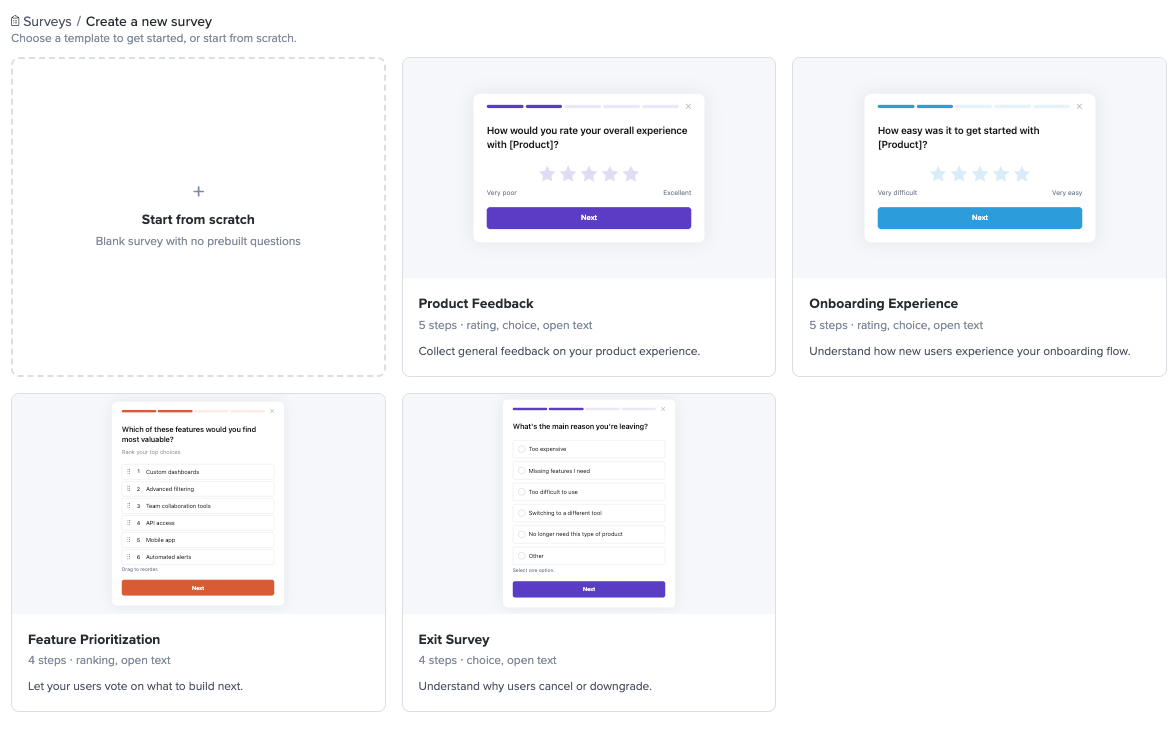
Each template comes with questions, answer options, and suggested targeting already set up. Use them as-is or customize anything — they're meant to get you moving, not box you in.
Documentation
- Surveys Quick Start — Create and launch your first survey step by step.
- Creating Surveys — Full reference for the survey builder: question types, multi-question flows, conditional logic, design customization, audience targeting, and settings.
- Survey Analytics — Understanding the survey dashboard, question breakdowns, individual responses, text search, session replay links, the Survey Response session filter, and timeseries charts.
- Survey Best Practices — Tips for writing effective surveys, common use cases, a concrete walkthrough example, and FAQs.
How surveys appear to your users
When a user matches your audience targeting criteria, the survey appears as a small widget anchored to one of the four corners of the screen (configurable in the Design tab.
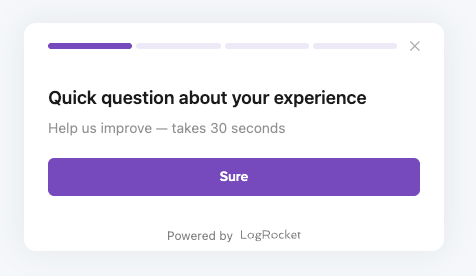
Once a user completes or closes a survey, they will not see it again — even if they return to the same page in a new session.
By default, the survey widget renders automatically when the LogRocket SDK initializes.
Mobile Surveys are not yet available. Please contact [email protected] to join the waitlist.
Notifications
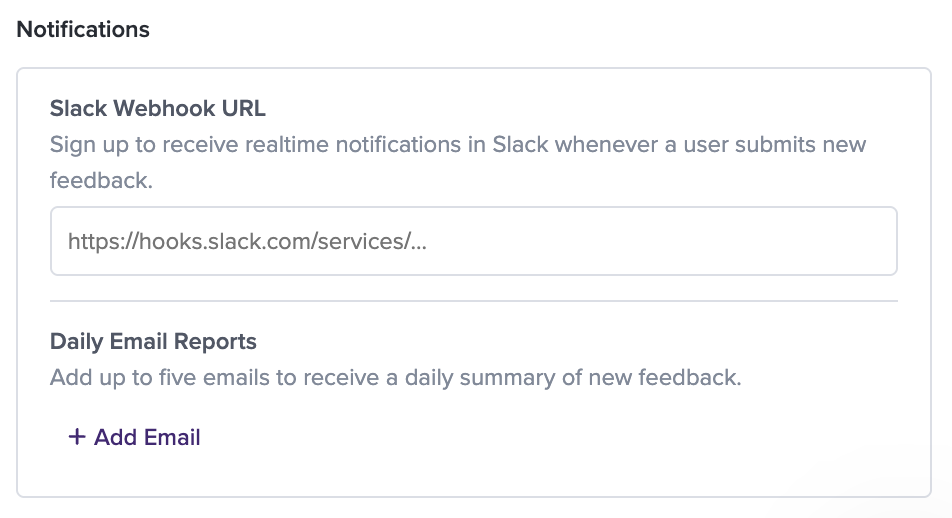
- realtime Slack notifications whenever a user submits a response
- Daily email reports that summarize new feedback
Updated about 18 hours ago