

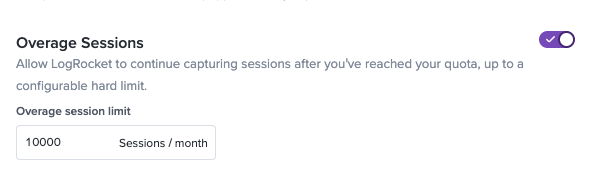
Overage Sessions
Allow LogRocket to keep recording sessions after you've hit your quota
Overage sessions let LogRocket keep recording after you reach your session quota. You're billed for each extra session, up to a limit you set.
How it works
Every LogRocket plan includes a session quota for each quota period. Without overage sessions, LogRocket stops recording new sessions once you reach that quota and starts again when the quota resets.
With overage sessions turned on, recording continues past your quota. Each session recorded above your quota is an overage session, billed at your plan's overage rate. You also set an overage limit. Once you reach it, recording stops until your quota resets, so your overage cost can't go above that limit times your overage rate.
When to use it
Overage sessions are a good fit if:
- Your traffic is seasonal or uneven, and you only need more sessions in some months
- You're not sure what your long-term volume will be and would rather start on a smaller plan
- You don't want a traffic spike to leave a gap in your recordings
If you go over your quota most months, a larger plan will cost less. Overage sessions are priced above your plan's per-session rate, so a higher committed quota is the better deal for steady volume.
Turn on overage sessions
- Go to Settings > Plans.
- Toggle on Overage sessions.
- Set your overage limit.
A credit card on file is required.
What you'll see
- An email to your Billing Email when you start recording overage sessions
- A notification in LogRocket once overage sessions have been recorded
- Your overage rate and usage on the Plans page
Billing
- Overage sessions are billed at your overage rate, shown on the Plans page. If you change plans, your overage rate changes with it.
- Overage is billed on its own invoice, separate from your plan subscription.
- Your overage count resets with your session quota at the start of each quota period.
- On an annual quota, overage applies only after you pass your quota for the year.
- Overage is billed to your credit card at the end of each cycle or sooner if unbilled overage reaches twice the amount of your current plan
- Overage session recording is paused if an overage invoice is unpaid for 3 days.
- Overage session terms can be found here.
FAQ
Does turning on overage sessions change my plan price?
No. You pay your plan price as usual, plus the overage sessions you record.
What happens when I reach my overage limit?
LogRocket stops recording new sessions until your quota resets, the same as reaching your quota without overage turned on.
Can I turn it off?
Yes. Turn off Overage sessions in Settings > Plans. You're still billed for any overage sessions already recorded.
Do mobile sessions count?
Yes. Web and mobile sessions share one quota, and overage sessions cover both.
Updated about 1 hour ago