

LogRocket MCP Server
An MCP server for integrating LogRocket data with your LLM applications
Summary
An MCP (Model Context Protocol) server that allows Cursor, Claude Code, Codex, and other MCP clients to query the LogRocket API for information about your LogRocket sessions, metrics, issues, and more. For example, allows you to:
- Pull in context about your app's behavior to help with debugging and fixing errors
- Get a better sense of how users interact with your app
- Query a user or account's sessions for targeted investigation
See Ask Galileo for information about what the LogRocket MCP server can help with.
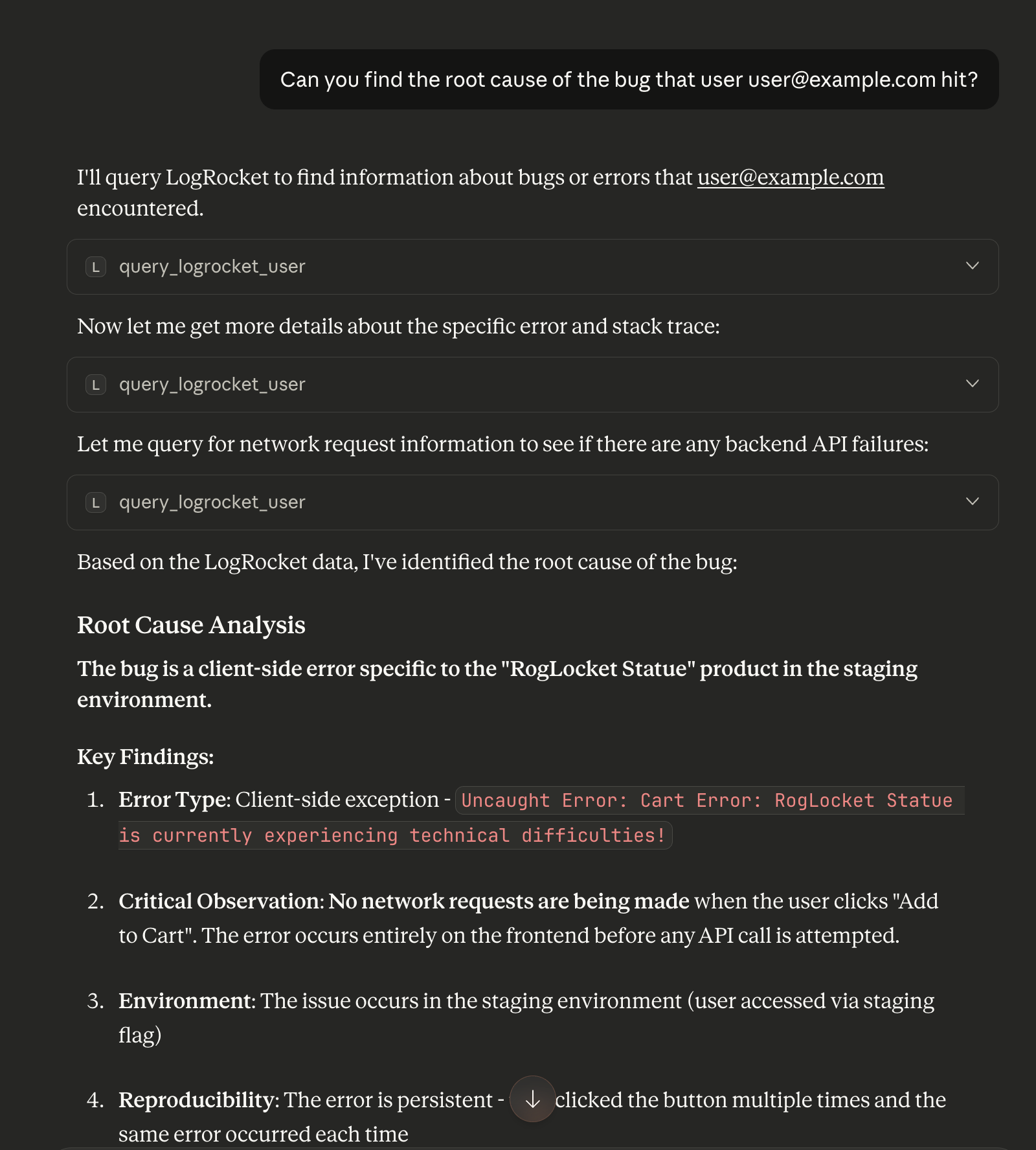
Example Prompts
Here are some examples of how you can use the LogRocket MCP server in your AI-assisted workflow:
- Fix user-reported issues: "User X reported a problem with checkout. Can you use LogRocket to watch their sessions, figure out the root cause, and fix it?"
- Understand feature usage: "I'm about to work on the search feature — can you use LogRocket to help me understand how it's currently being used?"
- Triage new issues: "Can you look at LogRocket for new issues from the past week, try to figure out their root causes, and then suggest which ones I can fix?"
- Check for regressions: "Look at all commits from last week, and check LogRocket data to ensure they didn't introduce any regressions."
- Prioritize your work: "Use LogRocket to watch sessions and look at issues to figure out what is highest priority that I work on next."
Suggested Automations
Because the MCP server can be called programmatically by AI agents, you can also set up powerful automations that continuously leverage LogRocket data:
- Research churning customers and low NPS scores: Automatically pull LogRocket sessions for users who are churning or leaving low NPS scores to understand what went wrong in their experience.
- Research new support tickets: Connect to your help desk to automatically research incoming support tickets using LogRocket session data. LogRocket offers out-of-the-box integrations with Zendesk and Intercom to attach session replays directly to tickets.
- Summarize user behavior for sales and customer success: Automatically generate summaries of how key accounts are using your product, giving your sales and customer success teams actionable insights.
- Connect LogRocket with your backend data: Build a skill that allows your agent to correlate LogRocket frontend data with backend observability tools (e.g., Datadog MCP) for end-to-end debugging.
- Run daily or weekly reports: Schedule an agent to look for new issues and UX frustration signals on a recurring basis, so your team is always aware of emerging problems.
Setup
The LogRocket MCP server is available at https://mcp.logrocket.com/mcp. The setup instructions below use this URL. It allows your MCP client to access the same LogRocket organizations and projects you can access in your browser.
Optional: You can also choose to restrict your MCP client's access to a specific LogRocket organization or LogRocket project by adding to the MCP server URL's path:
- To scope to an organization, use
https://mcp.logrocket.com/mcp/<your_organization_id> - To scope to a project, use
https://mcp.logrocket.com/mcp/<your_organization_id>/<your_project_id>
You can find organization and project IDs in most LogRocket URLs (e.g., https://app.logrocket.com/<your_organization_id>/<your_project_id>/s/...). You can also find them in the LogRocket dashboard under Settings > Project Settings. The App ID listed there has the form <your_organization_id>/<your_project_id>.
Tools
By default, the LogRocket MCP server exposes all available tools:
list_organizations: For listing the LogRocket organizations you can access. Hidden when scoping to a specific organization (e.g.,https://mcp.logrocket.com/mcp/<your_organization_id>).list_projects: For listing the LogRocket projects you can access within a given organization. Hidden when scoping to a specific project (e.g.,https://mcp.logrocket.com/mcp/<your_organization_id>/<your_project_id>).use_logrocket: For running natural language queries against your LogRocket data (e.g., sessions, metrics, and issues). Queries are handled by Ask Galileo which chains tool calls internally.find_sessions: For filtering LogRocket sessions.watch_sessions: For analyzing and/or extracting additional information about one or more sessions.get_network_entries: For retrieving the network requests and responses recorded during a single session, as a HAR document. Supports filtering by URL, HTTP method, response status, and time range.build_metric: For querying LogRocket analytics data.find_issues: For querying LogRocket issues data. Includes issue analyses when they exist.
You can limit which tools are exposed by using the toolsets query parameter when setting up your connection to the server. When toolsets is specified, only the tools from the specified toolsets are exposed. toolsets can be set to any comma-separated combination of supported values. For example, to expose only sessions and metrics tools, you'd use <base-url>?toolsets=sessions,metrics (e.g., https://mcp.logrocket.com/mcp?toolsets=sessions,metrics, or if scoping to a project, https://mcp.logrocket.com/mcp/<your_organization_id>/<your_project_id>?toolsets=sessions,metrics).
Supported toolsets and the tools they expose include:
sessions: Exposes thefind_sessions,watch_sessions, andget_network_entriestools.metrics: Exposes thebuild_metrictool.issues: Exposes thefind_issuestool.ask-galileo: Exposes theuse_logrockettool.all: Exposes all tools, same as the default behavior whentoolsetsis omitted.
NOTE: LogRocket MCP server tools are under active development and subject to change. Please contact [email protected] or your CSM to share feedback or get help.
Timezones
LogRocket metric queries group results into time buckets (e.g., sessions per day). By default, these buckets align to UTC. For example, daily buckets break at UTC midnight. LogRocket MCP tools that expose metric data (e.g., use_logrocket, build_metric) accept an optional IANA timezone (e.g., America/New_York) that can be used to align time buckets to that timezone's calendar instead.
Your MCP client will pass your local timezone when known, which you can override by passing an explicit timezone in individual queries (e.g., "sessions per day this week in America/New_York"). You can also set a default timezone for your connection using the timezone query parameter when setting up your connection to the server. For example, https://mcp.logrocket.com/mcp?timezone=America/New_York. This can be combined with the toolsets parameter (e.g., https://mcp.logrocket.com/mcp?toolsets=sessions,metrics&timezone=America/New_York). Invalid timezone values are ignored, in which case time buckets align to UTC.
Authentication
Most MCP clients will ask you to authenticate using OAuth after you add the LogRocket MCP server. We recommend using OAuth when possible. It's the most secure authentication option we offer and will allow your MCP client to access the same LogRocket organizations and projects you can access in your browser.
However, we understand that OAuth authentication can be difficult in some contexts, such as when running server-side. In these cases, you can use an API key to authenticate instead by sending the Authorization header on your MCP requests (e.g., "Authorization": "Bearer <your-api-key>"). Some examples for popular MCP clients are provided below. API keys can be created in the LogRocket dashboard under Settings > API Keys. API keys are project-scoped, so you'll need to create one and configure a separate MCP connection for each project you want your MCP client to be able to access.
Cursor

To install manually:
-
Press
⌘+Shift+Jto open Cursor Settings. -
Select Tools & MCP.
-
Select New MCP Server.
-
Add the following JSON:
{ "mcpServers": { "logrocket": { "url": "https://mcp.logrocket.com/mcp" } } } -
Connect to the MCP server in the settings screen to authenticate.
Using an API key
Set the Authorization header to connect to the LogRocket MCP server with an API key instead of OAuth. Create an API key in the LogRocket dashboard under Settings > API Keys. Then configure the Authorization header as follows:
{
  "mcpServers": {
    "logrocket": {
      "url": "https://mcp.logrocket.com/mcp",
      "headers": {
        "Authorization": "Bearer <your-api-key>"
      }
    }
  }
}
Claude
Claude Code
LogRocket is available as a Claude Code plugin. To install:
- Open Claude Code by running
claude. - Type
/pluginto launch the plugin manager. - Under the Discover tab, search for
logrocket. Select and install thelogrocketplugin. - Follow the instructions to reload plugins (
/reload-plugins) and authenticate (/mcp> Built-in MCPs > plugin:logrocket:logrocket > Authenticate).
You can also connect to the LogRocket MCP server directly (e.g., to use a custom MCP server URL and/or API key):
-
Open your terminal to access the CLI.
-
Run:
claude mcp add --transport http logrocket https://mcp.logrocket.com/mcp -
Follow the prompts to authenticate. If authentication doesn't happen automatically, trigger it manually with
/mcp.
Claude Desktop
LogRocket is available as a Claude connector. To install:
- In the Claude settings sidebar, under Customize, select Connectors.
- Click Add in the upper right corner, then select Browse connectors from the dropdown menu.
- Search for
logrocket. Select the LogRocket connector, click Connect, and follow the prompts to authenticate.
You can also connect to LogRocket by configuring a custom connector (e.g., to use a custom MCP server URL):
- In the Claude settings sidebar, under Customize, select Connectors.
- Click Add in the upper right corner, then select Add custom connector from the dropdown menu.
- Enter a name (e.g., LogRocket) and the remote MCP server URL (e.g.,
https://mcp.logrocket.com/mcp). - Click Add.
- Click Connect under the newly-added LogRocket connector to authenticate.
Using an API key (Claude Code)
Set the Authorization header to connect to the LogRocket MCP server with an API key instead of OAuth. Create an API key in the LogRocket dashboard under Settings > API Keys. Then configure the Authorization header as follows:
claude mcp add --transport http logrocket https://mcp.logrocket.com/mcp --header "Authorization: Bearer <your-api-key>"Codex
-
Open your terminal to access the CLI.
-
Run:
codex mcp add logrocket --url https://mcp.logrocket.com/mcp -
Run:
codex mcp login logrocketAnd follow the prompts to authenticate.
Using an API key
Set the --bearer-token-env-var option to connect to the LogRocket MCP server with an API key instead of OAuth. Create an API key in the LogRocket dashboard under Settings > API Keys. Then export it as the value of an environment variable (e.g., export LOGROCKET_API_KEY=<your-api-key>) and configure Codex as follows:
codex mcp add logrocket --url https://mcp.logrocket.com/mcp --bearer-token-env-var LOGROCKET_API_KEYVS Code

To install manually:
- Press
⌘+Pand search for MCP: Add Server. - Select HTTP (HTTP or Server-Sent Events).
- Enter the URL
https://mcp.logrocket.com/mcpand hit enter. - Enter the name LogRocket and hit enter.
- Follow the prompts to authenticate.
- Activate the server using MCP: List Servers, selecting LogRocket, then selecting Start Server.
Using an API key
Set the Authorization header to connect to the LogRocket MCP server with an API key instead of OAuth. Create an API key in the LogRocket dashboard under Settings > API Keys. Then go to MCP: Open User Configuration and configure the Authorization header in mcp.json as follows:
{
  "servers": {
    "logrocket": {
      "type": "http",
      "url": "https://mcp.logrocket.com/mcp",
      "headers": {
        "Authorization": "Bearer <your-api-key>"
      }
    }
  }
}
Updated about 2 months ago